

Table of Contents
- Smart Home Essentials for Living: What Actually Earns Its Place
- Smart Home Devices for Beginners: The Four Categories That Matter
- Smart Home Gadgets Worth Buying First
- Smart Home Accessories That Solve Small Daily Annoyances
- Smart Home Setup: Order of Operations for a Renter or First-Time Owner
- What Smart Home Essentials Cost and What Adds Up Over Time
- Mistakes That Turn Smart Home Essentials Into Closet Clutter
- Frequently Asked Questions
Last Updated: October 12, 2026
Smart Home Essentials for Living: What Actually Earns Its Place
The category has a clutter problem: shelves are crowded with gadgets that promise convenience and deliver an app you open twice. A smart home that works comes down to picking devices that solve a specific, recurring annoyance.
Below, the guide breaks smart home devices for beginners into four categories, then names the gadgets worth buying first. The throughline: buy for the routine, not the novelty.
Smart Home Devices for Beginners: The Four Categories That Matter
Most starter setups fail because buyers shop by gadget instead of by category. Grouping devices by the job they do makes the project easier to plan and budget.
Lighting and Motion
Lighting is the most forgiving entry point. A motion-activated light in a hallway or closet solves a daily task with no hub, account, or wiring. Look for rechargeable models to avoid ongoing battery costs, and warm color temperature for spaces where harsh white light feels wrong at night.
Entry Awareness and Security
Entry awareness covers doors, windows, and the moments when someone comes or goes. The simplest version is a contact sensor that sounds an alarm when an armed door or window opens. These are battery-powered, adhesive-mounted, and useful for renters.
Climate and Air
Climate devices handle temperature, air quality, and comfort. Slow down here: thermostats and air systems often require professional installation and can conflict with existing equipment. Start with a standalone monitor before committing to anything tied into the home's heating and cooling.
Power and Charging
Power and charging is the least glamorous category and the one people use most. A single station that charges a phone, watch, and earbuds overnight removes three cables from a nightstand. It rarely needs an app, which is exactly why it works.
Smart Home Gadgets Worth Buying First
Start with devices that work without a hub, subscription, or permanent installation. That covers most renters and first-time owners.
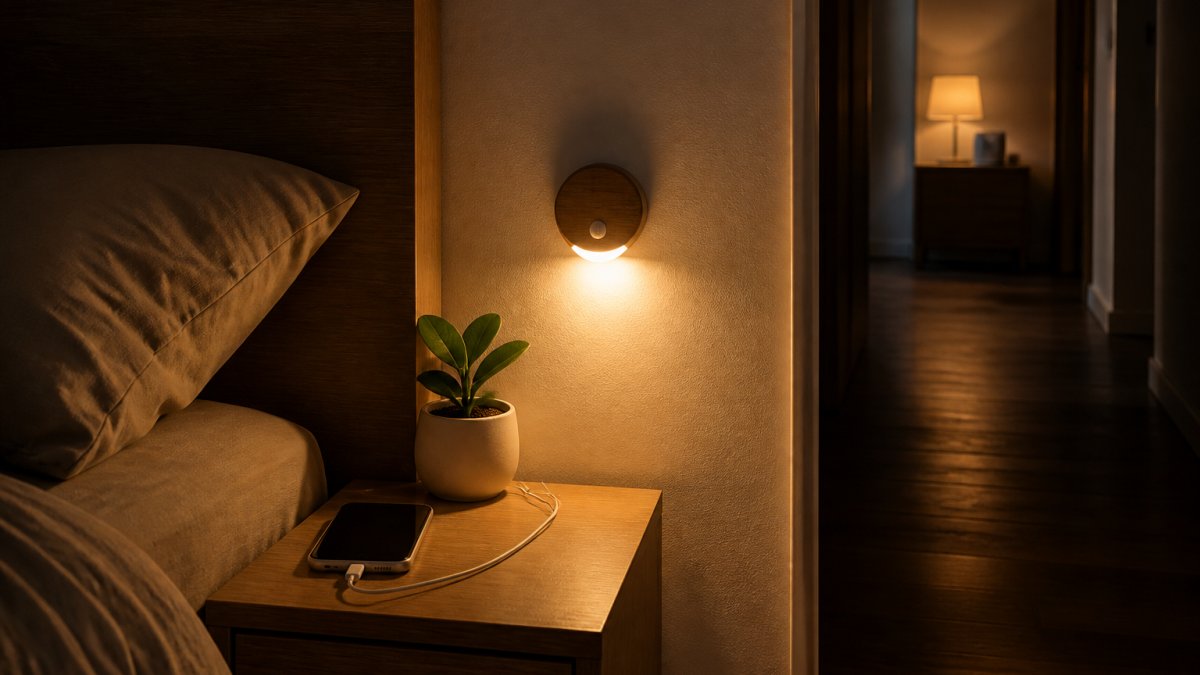
Rechargeable Motion Sensor Night Light
The Rechargeable Motion Sensor Night Light from Nuksy is the best first purchase for most households.
The warm 2700-3000K LED output suits hallways, closets, stairways, and cabinets. A 500mAh built-in battery handles the load, and continuous light mode runs for approximately 6 hours.
The one drawback: it is an indoor accent light, not a room light.
6-Pack Wireless Door and Window Alarm Sensors
For entry awareness, the 6-Pack Wireless Door and Window Alarm Sensors covers six openings in one purchase. Each unit is a two-piece magnetic contact sensor that sounds an alarm at up to 95dB when an armed door or window opens.
This is a deterrent and awareness tool, not a monitored security system. It will not call anyone or send a phone alert.
3-in-1 Foldable Magnetic Wireless Charging Station
The 3-in-1 Foldable Magnetic Wireless Charging Station replaces the tangle of cables on a nightstand or desk.
The magnetic phone area holds a compatible magnetic phone in position while charging, and the foldable body collapses for travel. It is USB-C powered and includes a Type-C cable, though a wall adapter is not included. Available in White, Black, Blue, and Pink, and priced at $37.90.
| Device | Price | Power Source | Installation | Best For |
|---|---|---|---|---|
| Motion Sensor Night Light | $32.90 | Rechargeable 500mAh battery | Magnetic base | Hallways, closets, stairs |
| Door and Window Alarm Sensors | $20.90 | 3 x LR44 per alarm | Adhesive | Renters, entry awareness |
| 3-in-1 Charging Station | $37.90 | USB-C | None | Nightstands, desks, travel |
Smart Home Accessories That Solve Small Daily Annoyances
Accessories are where a setup stops feeling like a project and starts feeling useful.
A Cordless Electric Spin Scrubber handles the scrubbing that makes bathrooms and kitchens a chore.
The Electronic Clock at $43.79 is the quiet workhorse of a nightstand or desk.
The 2-Pack 1080° Swivel Faucet Aerator and Extender at $16.90 fixes a genuinely frustrating sink.
Smart Home Setup: Order of Operations for a Renter or First-Time Owner
Setup order matters more than device choice. A sensible sequence keeps the project cheap, reversible, and free of devices that talk to nothing. The two angles most guides skip are interoperability, whether devices work together across platforms and standards, and room-by-room sequencing, which turns a vague shopping list into a plan.
Start With Interoperability, Not With Gadgets
Before buying anything, decide how devices will connect. There are three common paths:
- No-network devices. Motion lights, contact alarms, and charging stations work with no Wi-Fi, no hub, and no account. They are the safest first purchase because nothing can break when the internet drops.
- Wi-Fi devices. These connect directly to your router. Convenient, but each one adds a device to your network, and many depend on a manufacturer's cloud service to function.
- Hub or bridge devices. Some sensors and locks use a proprietary bridge that talks to your router. The bridge adds a piece of hardware and often a second app.
Matter is the cross-brand standard a growing number of devices now support, designed so a device from one brand can be controlled by a platform from another.
The practical rule: if you plan to add more than three or four devices, favor Matter-compatible products or devices that work locally without a cloud account. If you plan to stay under five devices, no-network devices are the lowest-risk choice.
Room-by-Room Starter Plans
Instead of buying by gadget, buy by room.
3-in-1 Foldable Magnetic Wireless Charging Station →
Entryway. Start with a contact sensor on the main door.
Hallway or stairwell. A rechargeable motion night light is the whole plan.

Bedroom. Start with a charging station to clear the nightstand.
Kitchen. A faucet aerator or an under-cabinet motion light solves the two most common kitchen annoyances.
A Sensible Order of Operations
- Pick one room and one recurring annoyance: a dark hallway, a door that opens unexpectedly, a nightstand covered in cables.
- Buy one device for that annoyance. Stay under $40 to keep the experiment low-risk.
- Live with it for two weeks before buying anything else.
- Confirm what the device needs, Wi-Fi, a hub, batteries, or nothing, and whether it works when the internet is down.
- Move to the next room only after the first device proves itself.
- Keep a written list of what each device does, how it connects, and where its power comes from. This prevents duplicate purchases and app sprawl.
Renters should prioritize adhesive and magnetic mounting for every device. It keeps the deposit intact and makes moving day simpler.
What Smart Home Essentials Cost and What Adds Up Over Time
The purchase price is only part of the math. Total cost of ownership includes batteries, replacement parts, subscriptions, hubs, and time spent managing accounts. Most roundups stop at the sticker price, which is why so many buyers are surprised six months in.
Upfront Costs
Starter devices are cheap individually. The night light is $32.90, the door and window sensors are $20.90 for six, and the charging station is $37.90.

The upfront math changes fast once you add categories. A video doorbell, smart thermostat, and smart lock together can cost several times what the starter three cost, and two of those three often require professional installation or existing wiring.
The Costs Buyers Forget
Subscriptions. Many cameras and video doorbells charge a recurring fee for recorded clips, person detection, or cloud storage.
Hubs and bridges. Some sensors, locks, and bulbs require a proprietary hub sold separately.
Batteries and consumables. Rechargeable devices avoid disposable battery purchases, but they need a cable and a free outlet.
Replacement cycles. Smart devices do not last forever.
Reliability Is a Cost Too
Devices that depend on a cloud service can stop working when that service changes or ends, or when the internet goes down. Devices that work locally, a motion light, a contact alarm, a charging station, keep working regardless of the network or the manufacturer.
A common pattern is to split the setup: use local devices for anything relied on daily, and reserve cloud-dependent devices for convenience features where an outage is annoying but not disruptive.
| Cost Type | Example | Frequency |
|---|---|---|
| One-time device purchase | Motion night light, $32.90 | Once |
| Hub or bridge | Required by some sensors and locks | Once |
| Consumable batteries | LR44 cells for door sensors | Every few months |
| Subscription | Cloud storage on some cameras | Monthly or yearly |
| Replacement parts | Charging cables, brush heads | As needed |
Mistakes That Turn Smart Home Essentials Into Closet Clutter
The most common mistake is buying a device before identifying the problem it solves.
A second mistake is ignoring how devices connect. Some use Wi-Fi, some a proprietary bridge, and some need nothing at all.
A third is overbuying at the start.
The fix is unglamorous. Buy one device, use it daily for two weeks, and keep it only if it removed a real annoyance.
Building a home that runs more smoothly does not require a hub, a subscription, or a weekend of installation. Nuksy carries the practical pieces that fit that approach, including the rechargeable motion sensor night light, the 6-pack wireless door and window alarm sensors, and the 3-in-1 foldable magnetic wireless charging station, alongside free U.S. shipping on every order, easy returns, and secure checkout.

Frequently Asked Questions
What are the essentials for a smart home?
Start with the four categories that change daily life the most: lighting, entry awareness, climate, and power. Motion-activated lights cover hallways and closets, door and window sensors add awareness at entry points, a smart thermostat handles heating and cooling schedules, and a charging station keeps devices topped up. You do not need every category on day one. Pick the one that solves your most repeated annoyance, live with it for a month, then add the next.
What should you consider before choosing a smart home device?
Check three things first. Does it need a hub or work over Wi-Fi on its own? Does it require an app account, and what data does that account collect? And does it work without permanent installation, especially if you rent. A device that installs with adhesive or a magnetic base is easy to remove later. Also confirm whether it needs a wall adapter, since some charging accessories ship with a cable only.
How much do smart home essentials cost?
Entry-level essentials are inexpensive when bought one at a time. A motion sensor night light runs $32.90, a six-pack of wireless door and window alarm sensors is $20.90, and a 3-in-1 magnetic wireless charging station is $37.90. The bigger cost is often the recurring kind: subscriptions for camera storage, replacement batteries, and the electricity that always-on devices draw. Budget for those before you buy a whole category at once.
How do you choose smart home devices that work together?
Pick one ecosystem first, then buy devices that speak to it. If you already use a voice assistant regularly, filter your shopping list to devices that support it. For anything that does not connect to a network at all, such as a magnetic door sensor or a rechargeable night light, compatibility is a non-issue, which makes them safe first purchases. Group devices by room in your app so routines stay manageable as the count grows.
How can you start building a smart home one device at a time?
Work room by room instead of category by category. Start in the room you use most, add one device that fixes a specific problem there, and use it for two weeks before expanding. A hallway night light that turns on with movement is a good first step because it needs no wiring and no account. Once that habit sticks, add entry sensors, then charging, then climate. This order keeps spending predictable and prevents unused gadgets.